Context
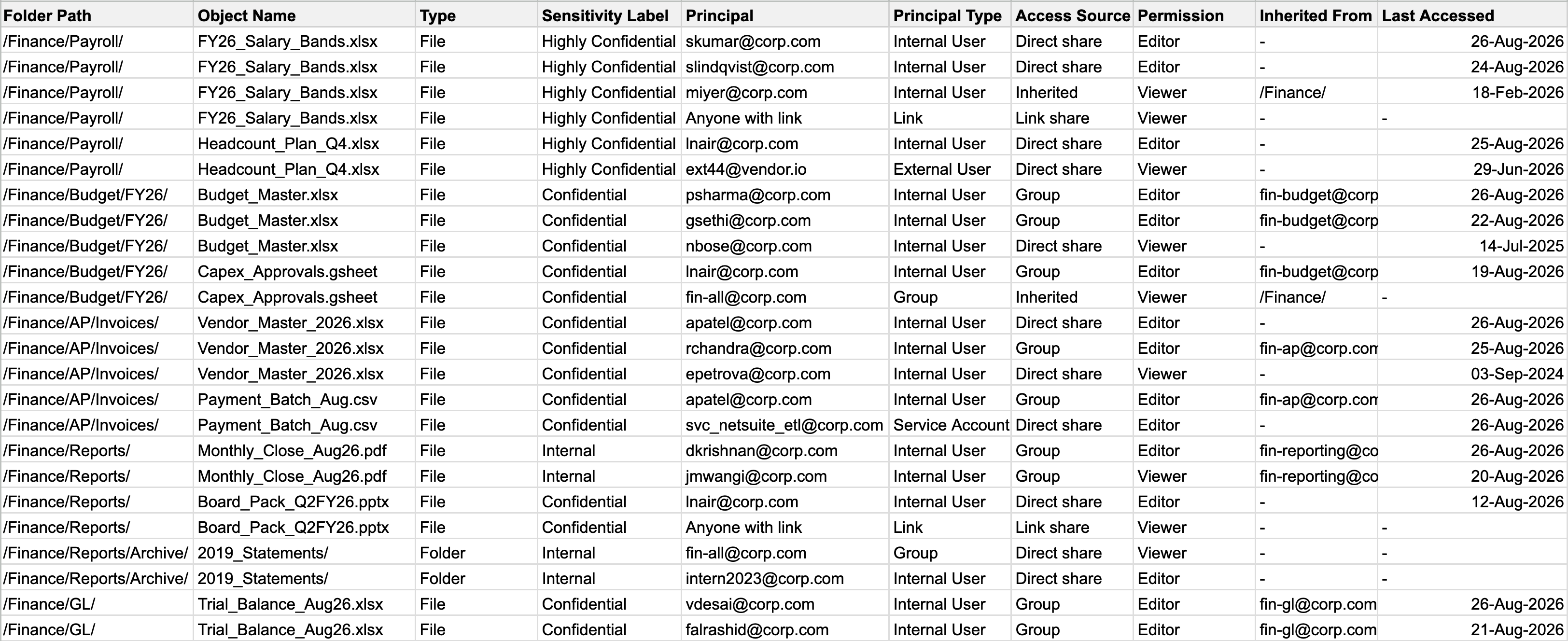
Every organization collects access debt. People join, switch teams, run one-off projects, and leave, but the permissions they’re granted rarely follow the same journey. A finance folder meant for 12 people ends up accessible to 200, including contractors and employees who have already left.
A user access review is a periodic audit that corrects this. Regulations like SOX, GDPR, and HIPAA require organizations to prove that someone with authority regularly reviews access grants and makes conscious decisions to keep or revoke them.
This is rarely a one-person job:
- Compliance officer owns the deadline to complete the review
- Manager certifies their team’s access
- Data owner certifies who can see their files and databases
- IT officer executes revocations

An example of an excel sheet used to do reviews manually.
Why it's painful today
Access is scattered
Every drive, site and app keeps its own separate list.
Pulled by hand
Exports get stitched into spreadsheets that go stale immediately.
Endless chasing
Reminders by email, answers tracked in someone’s inbox.
Nobody's sure who decides
The person with access rarely knows if it’s still justified.
Rubber-stamped
Under deadline, everything gets approved and nothing is removed.
Hard to prove
When the auditor asks, the trail has to be rebuilt from scratch.
Our goals
Efficiency
A reviewer should spend their time on the actual decisions that matter, not 400 that don’t.
Accuracy
Provide enough data to take the correct decisions, which will improve security and reduce risk.
Flexibility
Allow users to define different workflows which can be applied to multiple reviews based on requirements.
Collaboration
Provide an easy way for different teams to collaborate.
My Approach
The hard part of UAR isn’t the review screen. It’s that no two organizations run the review the same way — different reviewers, different granularity, different evidence, different consequences for silence.
So I stopped designing a review flow and designed the thing that produces one. An admin configures a workflow once; every analysis after that inherits it. The reviewer never sees the configuration — they see a review that looks purpose-built for their org.
The moving parts
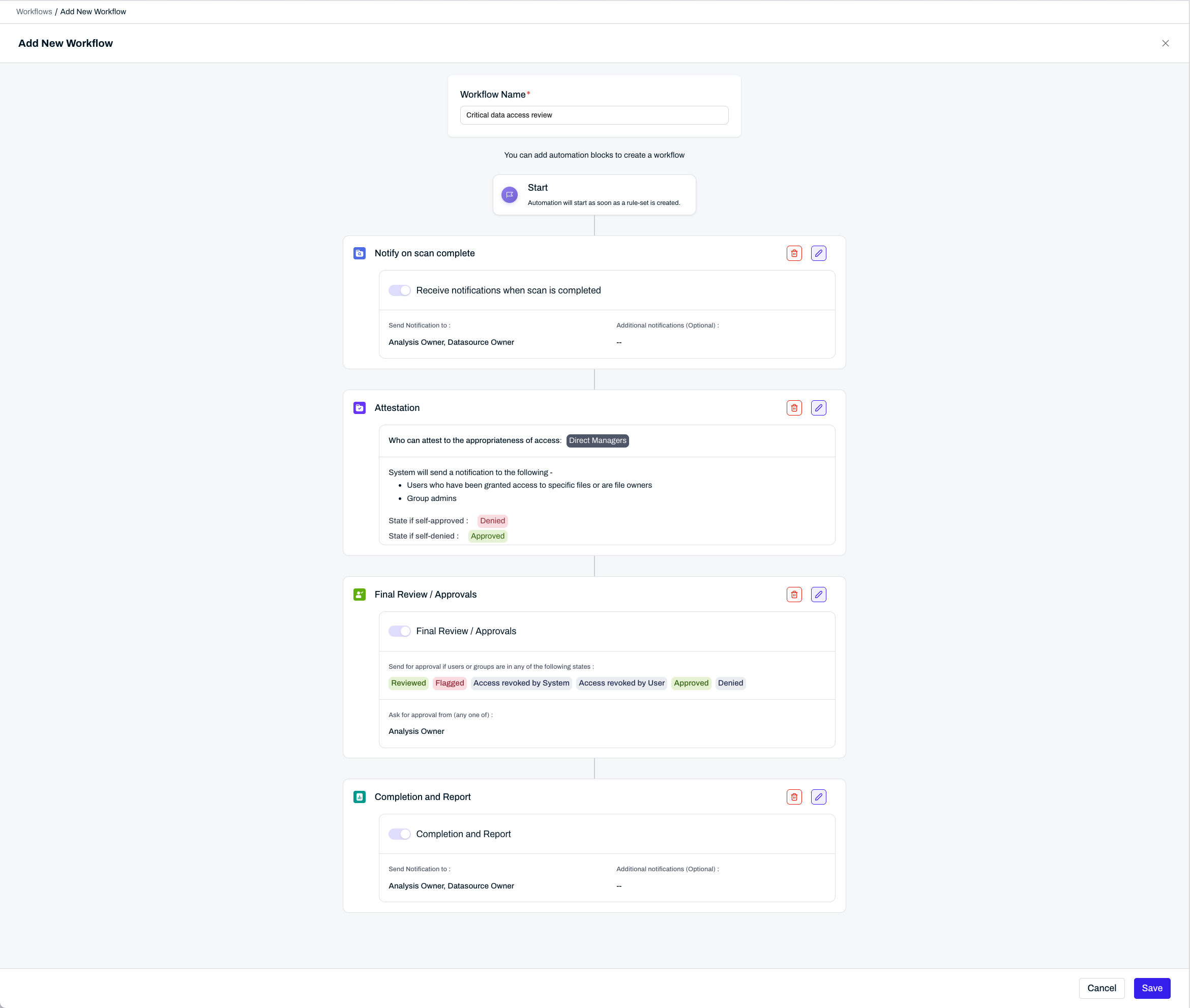
- Workflow template — set up once, by an admin. Defines who is asked, in what order, what happens if they don’t respond, and who signs off.
- Scope — what’s being reviewed: a folder, a drive, a site, or a connected app.
- The access list — LightBeam scans the scope and returns every user, group, and object with access, along with how that access was granted.
- Attestation — the people who hold the access confirm whether they still need it. Depending on the workflow, that’s the user, their manager, or a designated reviewer.
- Decision — the reviewer keeps or removes each grant, with the attestation and access context in view.
- Sign-off — an approver closes the cycle. LightBeam executes the removals and produces the audit record.
- Recurrence — the analysis re-runs on a schedule. Later runs surface what changed since the last one rather than restarting from zero.
Solution
Define how the review should be done and by whom
The workflow is a set of blocks which tell the system what needs to happen at every stage and who is responsible for what actions.
Create review and select scope
The folder, drive, site or app which the user wants to review along with the workflow they want to use for the review.
Attestation and access control
Users, reviewers, managers, etc. can accept or reject their access or decide to revoke access for users or groups who don’t need it. An authorized person can sign off once all attestations are complete and mark the review as done.
Where it landed
I left LightBeam just as we rolled this feature out, so it’s difficult to articulate the impact in terms of number of customers or POCs. I do know what I would have loved to measure from customers.
The two goals we defined, efficiency and accuracy, pull against each other sometimes.
- Efficiency — Reviewers want to complete more reviews faster, which may mean rubber-stamping.
- Accuracy — An increase in revocations would indicate to some degree that information is being scrutinized more.
Both moving together means that the design worked. This is what I would have tested to validate the designs.